STORM

Compositor-based terminal UI framework. Fast. Layered. Unstoppable.

LIVE_SYSTEM.TSX
import { render, Box, Text, Spinner } from "@orchetron/storm"; const App = () => ( <Box borderStyle="round" padding={1}> <Spinner type="dots" /> <Text bold color="#82AAFF"> Storm is running </Text> </Box> ); render(<App />).waitUntilExit();
Performance DNA

Numbers that matter.

0

Skip Rate

Cell-level diff renders only changed characters. 97% of the terminal is untouched on a typical frame.

<0

Frame Time

Sub-millisecond imperative rendering path. No React reconciliation for scroll, animation, or live data.

0

Components

97 components, 15 AI widgets, 83 hooks, 20 headless behaviors. Everything you need, built in.

Differentiators

ENGINEERED
DIFFERENT

The architecture decisions that make Storm fast, flexible, and production-ready.

grid_on

Cell-Level Rendering

Storm diffs at the individual character level -- only changed cells are written to the terminal. On a typical frame, 97% of the screen is untouched. Typed-array buffers eliminate GC pressure entirely.

speed

Dual-Speed Architecture

Structure your UI with React components. Animate at 60fps with imperative rendering. Two rendering paths, zero compromise -- declarative when you want clarity, imperative when you need speed.

terminal

SSH App Serving

Serve your terminal UI over SSH with built-in auth, rate limiting, and session management. Each connection gets its own isolated React tree with full keyboard, mouse, and resize support.

history

Time-Travel DevTools

Record every frame. Scrub back and forth through render history. Inspect component trees, measure performance, audit accessibility -- all built in. Explore →

webhook

83 Hooks + 20 Headless Behaviors

Build any interaction pattern without writing keyboard handling from scratch. Select, list, menu, tree, table, form, calendar -- tested logic, your visual design.

extension

Plugin Ecosystem

Extend everything. Async setup, scoped effects, inter-plugin communication, topological dependency sorting. Build plugins that ship as npm packages.

grain

Buffer-Level Backgrounds

Dot grids, line grids, gradients, watermarks, animated patterns — painted directly into the cell buffer. One prop on any Box. No other terminal framework has this.

palette

12 Themes + Live CSS

12 built-in themes. Custom themes via createTheme(). Personality system for borders, animation, typography. Live .storm.css hot-reload with CSS-like selectors and specificity.

Internals

Rendering Pipeline

From React tree to ANSI escape codes. Five stages. Sub-millisecond. Deep dive →

Stage 01

React Tree

<Box>
├─ <Text>
└─ <Item> MUT

Custom reconciler transforms JSX into a normalized element tree.

Stage 02

Layout Engine

flex:2
1
1

Pure-TS flexbox + CSS grid. Computes position and size for every node.

Stage 03

Cell Buffer

char
fg
bg
attr

Typed arrays: char, fg, bg, attrs per cell. Double-buffered.

Stage 04

Diff Engine

97% of cells skipped. Only mutations written.

Stage 05

Terminal

\x1b[3;8H
\x1b[38;2;130;170;255m
Storm

Batched ANSI escapes. Single write call per frame.

React Tree / Layout Engine / Cell Buffer / Diff Engine / Terminal
Architecture 01

Cell-Level Diffing

A 200x50 terminal has 10,000 cells. On a cursor blink, 9,970 cells are identical to the previous frame. Storm writes only the 30 that changed.

Traditional 10,000 cells rewritten
Every cell. Every frame.
Storm 2 cells written
97% untouched. Zero waste.
0
cells per frame
0
cells written
0
skip rate

No Cell objects. No GC. Int32Array + Uint8Array — raw typed memory. At 60fps, that's 600,000 cells/second with zero garbage collection.

Architecture 02

Dual-Speed Rendering

React reconciliation for structural changes. Imperative requestRender() for scroll, animation, and live data — bypasses React entirely. Two rendering paths, one framework.

setState path ~5-10ms per update
reconcile
layout
paint
diff
4 stages
requestRender() path <0.5ms per update
paint
diff
2 stages — 10-20x faster

Use useState for structural changes (new screens, adding items). Use requestRender() for anything that updates frequently — scroll, animation, live metrics. Same framework, two speed modes.

Live Demo

See It In Action

Cell matrix opening. Streaming AI response. Live metrics. Code diff. All running in a terminal.
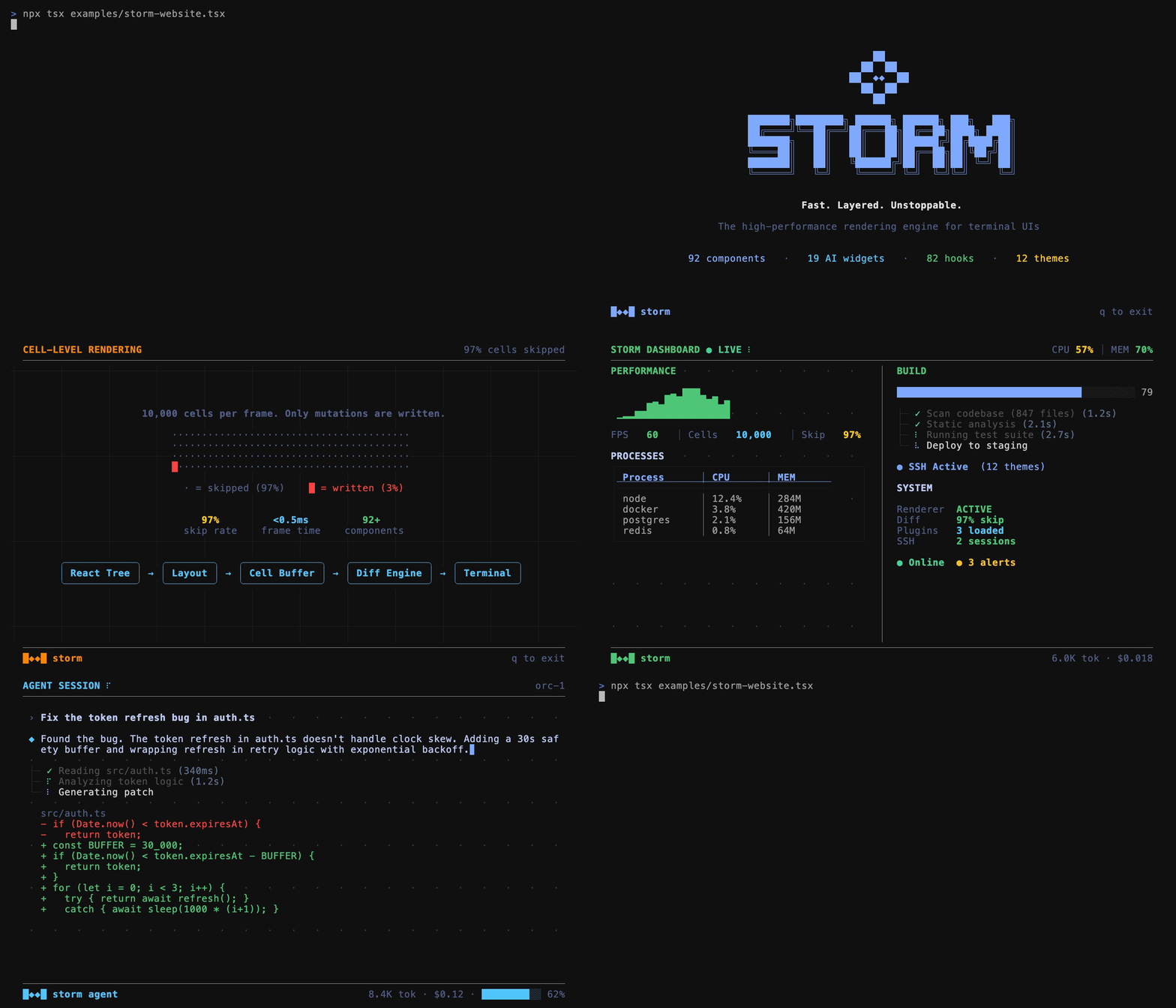
TERMINAL
Storm TUI Demo
SYSTEM_SPEC_v0.1

97

Components. Everything you need.

Input Data Layout Visualization Feedback Core Navigation Content
15 AI Widgets 83 Hooks 20 Headless Behaviors 12 Themes
Browse all components →
AGENT_TOOLKIT

15

AI Agent Widgets. Built for what comes next.

OperationTree MessageBubble StreamingText ApprovalPrompt CostTracker ContextWindow SyntaxHighlight TokenStream
Chat interfaces · Coding agents · Autonomous systems
Browse all widgets →
Quick Start

Get Running in 30 Seconds

Install, import, render. That's it.

TERMINAL
$ npm install @orchetron/storm
APP.TSX
import React from "react"; import { render, Box, Text, Spinner, useInput, useTui } from "@orchetron/storm"; function App() { const { exit } = useTui(); useInput((e) => { if (e.key === "c" && e.ctrl) exit(); }); return ( <Box borderStyle="round" borderColor="#82AAFF" padding={1}> <Spinner type="dots" color="#82AAFF" /> <Text bold color="#82AAFF"> Storm is running</Text> </Box> ); } render(<App />).waitUntilExit();

UNLEASH THE STORM

$ npm install @orchetron/storm
GET STARTED

Available Now

Storm on Product Hunt